Key points
- A work order comes from a request, from the crew itself, or from a schedule.
- A title, an asset, a priority and a person are enough to get a job done.
- A request asks for work; only a work order authorizes it.
- Maintenance sets the priority, not the tone of the request.
- A closed work order is useful only if it was closed with words in it.
What a work order is
A maintenance work order (also called a job order or a service order) is one job, written down. When the job is finished, the same record says what was done, which parts went into it and how long it took.

Work orders come from three places.
Other trades use the term differently. In field service, the signed work order is customer paperwork and often the basis for the bill. In manufacturing, a production order says what product to make and how many. This guide is about the maintenance kind: an internal instruction and record of work your own crew does, and nobody is billed from it.
What goes on a maintenance work order
A title, an asset, a priority and a person are enough to get a job done, so a small crew does not need every field on day one. The full list:
- Title: the problem or the task, in one line. It is what everyone reads in a list.
- Asset and location: the machine, and where it is. The work lands in that machine’s history.
- Description: what was seen, when it started, what was tried. It saves a trip back to ask.
- Priority: how soon it has to be dealt with. It sets the order of the day.
- Work type: preventive, reactive or another kind. It counts planned against unplanned work.
- Assignees: one person, several, or a crew. Someone owns it.
- Start and due dates: when it can start, when it must be done. They show what is late.
- Estimate: expected hours. It plans the week against the hours people have.
- Checklist: steps to follow, readings to take. The job is done the same way every time.
- Parts: what it needs, from which storeroom. Parts are ready, and stock stays right.
- Notes: what was found and what was done. The next person learns from it.
- Attachments: photos, manuals, wiring diagrams. They show what words cannot.
- Status and history: where it stands; who changed what, when. It answers “what happened to that job?”
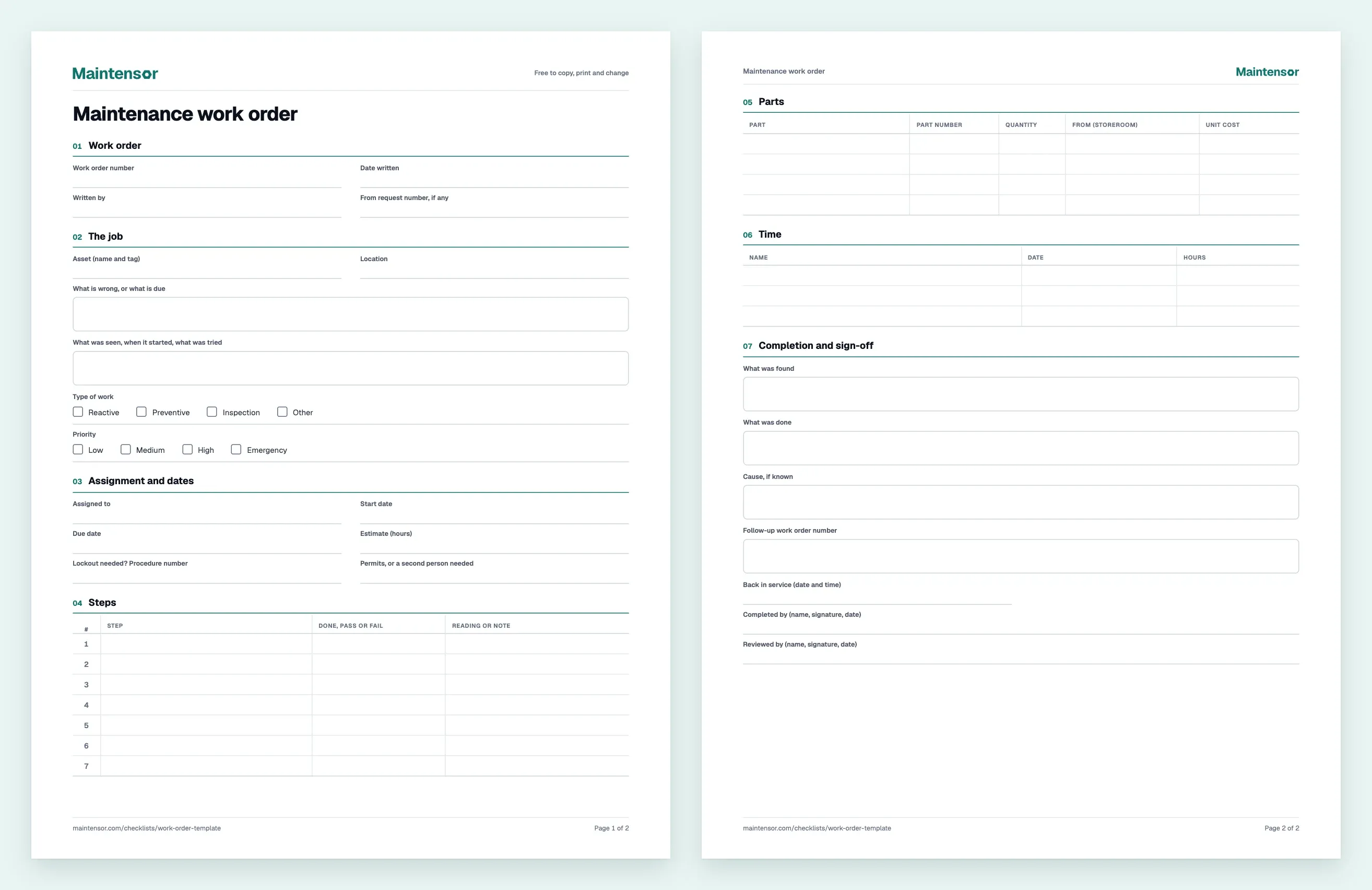
The work order template page explains the form and shows short versions for preventive and inspection jobs.
Work order example: a torn conveyor belt
ExampleWO-1047, filled in
A made-up packing plant; every name, number and part is invented.
| Field | Entry |
|---|---|
| Number | WO-1047 |
| Title | Replace torn belt on incline conveyor CV-3, Line 2 |
| Asset and location | Incline conveyor CV-3, Line 2, Packing hall |
| Description | Belt torn about 10 inches back from the splice, drive side, and growing. Belt walks toward the drive side under load. Night shift laced it temporarily. Reported by Luis Ortega, Line 2 lead. |
| Priority | High: the line runs at reduced speed until the belt is replaced |
| Work type | Reactive |
| Assigned to | Ben Carter (mechanic), Tom Reyes (helper) |
| Start and due | Saturday, November 7, during the planned shutdown |
| Estimate | 4 hours, two people |
| Checklist | 1. Lock out CV-3 under its written procedure; with everyone clear, try the start button, then return it to Off. 2. Remove the old belt. 3. Check pulley lagging and return rollers for wear. 4. Fit and splice the new belt to the belt maker’s instructions. 5. Tension the belt and refit the guards. 6. Tools out, people clear, remove locks. 7. Run empty 15 minutes, check tracking, hand back to the line lead. |
| Parts | 1 belt, 24 in by 38 ft; 1 mechanical splice kit; 2 return rollers, used only if worn. All from the main storeroom. |
| Attachments | Photo of the tear; the belt maker’s splice instructions |
| Notes, after the job | “Drive pulley lagging worn smooth on one side, likely why the belt walked. Lagging ordered, follow-up WO-1052 for the next shutdown.” |
| Time | Ben Carter 4 h 10 min, Tom Reyes 4 h 10 min |
| History | Created Friday 7:50 a.m. from Luis Ortega’s request, approved by Sarah Mitchell. In progress Saturday 6:05 a.m. Done 10:15 a.m. |
The technician can start without asking a question, and CV-3’s history now shows a belt failure that traced back to the pulley.
How to write a work order a technician can act on
Put the asset and the symptom or task in the title. Use the name on the machine’s tag, so the technician walks to the right one.
| Vague title | Title a technician can act on |
|---|---|
| Conveyor broken | CV-3 belt torn near the splice, Line 2 |
| Dock door | Dock door 4 stops halfway going up, then reverses |
| HVAC 3rd floor | RTU-2: 3rd floor east offices at 79 °F since Monday |
| Room 412 | Room 412: wall AC unit rattles on high fan, guest moved |
Three more rules:
- Describe what you saw, not your guess. “Grinding from the gearbox at start-up” helps more than “gearbox bad”.
- One problem per work order. If the torn belt and a leaking gearbox share a record, the gearbox is forgotten when the belt job closes.
- Say what done looks like when it is not obvious: “runs a full shift without tripping”, “room back in service”.
Say if the machine must be locked out
In the US, OSHA’s lockout/tagout rule (29 CFR 1910.147) covers servicing machines where an unexpected start-up could hurt someone, and requires written energy control procedures for that work. Point to the procedure on the work order.
The work order process, from request to close
A work order moves through eight steps.
- Request. Someone reports a problem: what is wrong, where, and how urgent it seems.
- Approve or decline. A supervisor reads it. It becomes a work order, or it is declined with a reason, such as a duplicate or already scheduled. A request that gets no answer teaches people to stop reporting.
- Plan. Parts, tools, people, an estimate, a checklist, a lockout. A job waiting on a part waits here, not half done on the floor.
- Schedule. Give it a person and a day, against the hours that person really has.
- Do the work. Follow the checklist and write down what you find.
- Record parts and time. What came off the shelf, and how long it took.
- Complete. Close it with what was found and done, and the cause if known.
- Review. The supervisor reads what closed, tells the person who asked, and watches for the same asset coming back.
Preventive work orders skip the first two steps: the schedule creates them. The preventive maintenance schedule guide covers building one.
Work request vs work order
A work request comes from anyone who notices and authorizes nothing. A work order comes from maintenance, and says what will be done, by whom, by when and with what. Work request vs work order goes through it line by line.
Work order priority levels
A simple scheme has four priority levels, each with a time to start within. It is a suggestion, not a standard: set the times to fit your site and post them where requests come in.
| Priority | What it means | Start within | Examples |
|---|---|---|---|
| Emergency | Someone could get hurt, or a line, a building system or a critical asset has stopped | Now | Line down, no heat in winter, a gas smell |
| High | Running but failing, or about to affect production, guests or safety | 24 hours | The torn CV-3 belt, one of two boilers down, a guest room out of service |
| Medium | Needs doing, no impact yet | 7 days | A torn dock door seal, a dripping staff restroom faucet |
| Low | Cosmetic or convenient | 30 days, or when someone is next in the area | Scuffed paint, a sticking cabinet door |
An emergency is dealt with first and written up after. For fire, smoke, a gas smell or an injury, that means getting people clear and calling 911 or your local emergency number before anything else. Maintenance sets the priority, not the tone of the request. If most open work is marked High, the word has stopped meaning anything.
Types of work orders: preventive, corrective, inspection and emergency
Four types cover most maintenance work orders.
Most sites add an “other” type for installs and moves. Keep the list short: its point is to count planned work against breakdowns. These work order types sit inside the wider types of maintenance. The preventive maintenance guide covers the practice, and the preventive maintenance checklist has tasks to start from.
How to use work order history
Closed work orders show what keeps failing, which parts you really use and how much work was planned, if each was closed with words in it. “Fixed” tells the next person nothing.
- Repeat failures. Sort closed work by asset once a month. The same problem on the same machine three times in a quarter needs a cause found or a preventive task, not a fourth repair.
- Parts use. Set shelf quantities from what work orders actually used, not from guesses.
- Planned against unplanned. Count work orders by type each month. A rising share of reactive work is an early warning.
- Questions that come later. When was the boiler last serviced? An auditor will ask.
Paper, a spreadsheet or software
Paper works for one or two people and a handful of machines, a spreadsheet while one person writes all the work orders, and software once jobs get lost between shifts and requests arrive by text, in the hallway and on sticky notes.
Work orders and requests in Maintensor
Maintensor is work order management software, and in it a work order needs only a title. The rest follows the list above. Priority is None, Low, Medium or High; type of work is Reactive, Preventive or Other; status is Open, In progress, On hold or Done. A work order can also repeat on a schedule.

A technician’s time runs from Start work until the work order is put on hold, sent back to Open or completed, and it can be added or fixed by hand. Stock comes off at completion, and the History tab records who did what.
Problems from outside the crew come in as requests. A requester signs in and reports the problem. An Admin approves it into a work order, setting its priority and due date, or declines it with a reason the requester reads on My requests. Requesters are free on every plan.
What it does not do
- There is no Inspection or Emergency type: an inspection is a checklist on a work order. A failed check asks for a note and a photo and offers a follow-up work order, but it never blocks closing the job.
- There is no priority above High, so an emergency is a High work order and a phone call.
- Only Admins see the request queue; a Full user has no Requests screen.
- A requester sends words only, no photo, and there is no public form. A requester’s picker lists every location and asset. A requester cannot run a checklist: that takes a Full user seat.
- There is no print layout for a work order.
On Pro and Max, an Admin can bring old work orders in with import from Excel or CSV: a row marked Done becomes history on its asset, without checklist answers, time or costs.