Key points
- Excel is not a CMMS: it holds the same information, but does something only when a person does.
- A ten-question test says when to move: six or more answers in the move column means move.
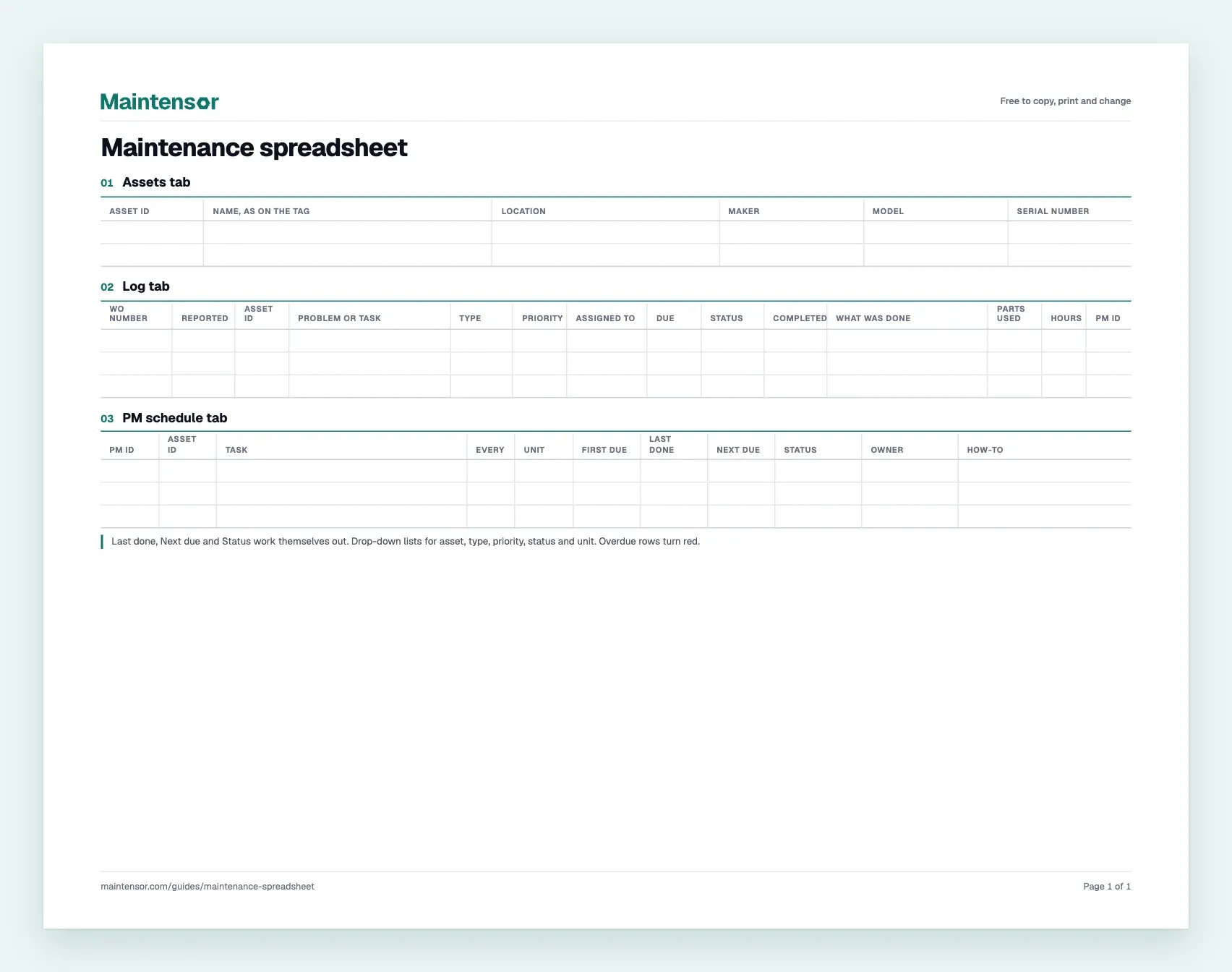
- The free Excel file below is one shared workbook with three tabs: Assets, Log and PM schedule.
- The log is only ever added to, and the schedule reads each last done date from it.
- When you move, carry over the assets and recurring jobs, and keep the old log as an archive.
A free maintenance spreadsheet template
One Excel file, free and with no sign-up, with three tabs that work together: Assets, Log and PM schedule. Log a preventive job with its PM ID and completed date, and that PM’s Last done, Next due and Status update themselves. Drop-down lists keep names the same, and overdue rows turn red. Each tab starts with one made-up example row to type over.
Is Excel a CMMS?
No, but it can do the job of one for a small crew. A CMMS (computerized maintenance management system) keeps the work, the equipment, the recurring jobs and the history in one shared record. What a CMMS is covers the rest of the picture.
That difference matters little when one person runs the shop and does or hands out most of the work. It matters a great deal when six people do. So the honest answer is “yes, until”, and the test below says until when.
The ten-question test
Answer each question for the last three months. The thresholds are our judgment for a crew of 2 to 15, not a standard: move them if your site is different. An answer between the two columns counts as half.
| Question | Stay on the sheet if | Time to move if |
|---|---|---|
| 1. How many people edit the sheet? | One | Three or more |
| 2. How many recurring jobs are on it? | Under 30 | Over 60 |
| 3. How many preventive jobs were missed, or found late, in the last quarter? | None | Two or more |
| 4. How long does “when was this last serviced?” take to answer? | Under a minute | Longer, or “ask Dave” |
| 5. How do people outside the crew report problems? | Rarely, and to one person | Several a week, by text, hallway and sticky note |
| 6. Do technicians record their own jobs? | No need: the keeper does or hears about every job | They should, and they do not |
| 7. How many jobs stopped for a part you thought you had? | None | Two or more |
| 8. Does anyone ask you for numbers, such as planned against unplanned work? | No | Every month, and it takes an afternoon |
| 9. Would it keep running if its keeper were away for two weeks? | Yes, someone else knows it | No |
| 10. Do you keep inspection records someone outside may ask to see? | No, or the sheet already holds who, when and what was found | Yes, and they are spread across files and clipboards |
Count the answers in the “time to move” column.
How the spreadsheet is set up
Build your own, or use this to change the file above.
The Assets tab needs little: an asset ID, the name as on the tag, the location, and the maker, model and serial number.
The work order log
One row per job, reactive or preventive. The letters are the columns the formulas below refer to.
The work order log, column by columnFourteen columns, A to N, with an example of each
| Column | What goes in | Example |
|---|---|---|
| A. WO number | A running number, never reused | WO-0147 |
| B. Reported | The date it came in | Oct 5 |
| C. Asset ID | From the Assets tab, by drop-down | AC-1 |
| D. Problem or task | One line, asset first | AC-1 trips on high temperature in the afternoon |
| E. Type | Reactive, Preventive or Other | Reactive |
| F. Priority | Your levels, written down somewhere everyone sees | High |
| G. Assigned to | One name | Luis Ortega |
| H. Due | A date | Oct 6 |
| I. Status | Open, In progress, Waiting on parts, Done | Done |
| J. Completed | The date the work was done, not the date it was typed | Oct 6 |
| K. What was done | What was found and what was done | Cooler fins packed with dust. Cleaned, ran 2 hours at normal temperature |
| L. Parts used | Part and quantity | None |
| M. Hours | Hands-on time | 1.5 |
| N. PM ID | The schedule row a preventive job came from; blank for other work | Blank here |
A printable version of the same fields is in the work order template, and the equipment maintenance log shows the one-machine view.
The PM schedule
One row per recurring job on one asset. Weekly is 7 days, quarterly is 3 months, yearly is 12 months.
The PM schedule, column by columnEleven columns, A to K, with the three formulas
| Column | What goes in | Example or formula |
|---|---|---|
| A. PM ID | A short code the log uses too | PM-07 |
| B. Asset ID | From the Assets tab | AC-1 |
| C. Task | What is done, in a line | Drain receiver, check belt, clean intake filter |
| D. Every | A number | 1 |
| E. Unit | days or months | months |
| F. First due | When the schedule starts | Nov 3 |
| G. Last done | Read from the log | =MAXIFS(Log!J:J, Log!N:N, A2) |
| H. Next due | From the last done, or the first due if never done | =IF(G2=0, F2, IF(E2="months", EDATE(G2, D2), G2+D2)) |
| I. Status | Flags late and close | =IF(TODAY()>H2, "Overdue", IF(TODAY()+7>=H2, "Due this week", "")) |
| J. Owner | One name | Luis Ortega |
| K. How-to | Where the steps are | AC-1 manual, maintenance chapter |
Two functions do the work:
- MAXIFS returns the latest completed date for that PM ID, and 0 when the log has none yet, which is why Next due checks for 0. It is in Excel 2019 and later and in Microsoft 365; Google Sheets has it too.
- EDATE adds whole months to a date.
If you build your own, format columns F to H as dates, sort by Next due, and add a conditional format that turns Overdue rows red.
A preventive job moves forward only when someone logs it, so the schedule cannot say a job was done that the log does not show. This version counts each next date from the last completion; the preventive maintenance schedule guide explains when fixed dates are the better choice.
Fifteen minutes a week
Once a week, the owner filters the schedule to Overdue and Due this week and hands those jobs out. Those fifteen minutes are the reminder a spreadsheet does not give you on its own.
Where spreadsheets break
Spreadsheets break in three ways the test does not catch. Two people overwrite the same row, or someone sorts one column and not the rest. Quick fixes never reach the sheet, so a machine’s history looks healthier than the machine. And the Status column turns red only when someone opens the file, so a week unopened is a week of missed preventive work.
Finding an overwrite
Excel’s Show Changes lists who changed a cell and its previous value, for the past 365 days in Microsoft 365, and Google Sheets has a cell edit history. But someone has to notice first, and Google says added or deleted rows may not show in a cell’s history, so a deleted job can leave no trace there.
When to move, and how to carry the sheet over
Move when the test says so, or at a natural break: a new hire, the keeper retiring, an audit coming. The Assets tab becomes asset records, and each row of the PM schedule becomes a recurring job.
- Do not retype the log. Keep the old file as a read-only archive.
- Carry the dates over. Use each recurring job’s last done date to set its first due date in the new system.
- Start on a set day. Enter the 20 assets that make the most work, and their recurring jobs.
- Add the rest later. The other assets go in as work orders need them.
A small crew’s first two weeks in a CMMS lays that out day by day, and how to choose a CMMS lists what to ask before you pick one.
If you move to Maintensor
On Pro and Max, an Admin can import the Assets and PM schedule tabs instead of typing them, and sees every row before anything is saved. Clean the tabs first: a row with no location is a row to fix, and the app matches an asset by its name, not an ID, so each PM row needs the asset’s full name. Even so, starting with the 20 assets that matter most is the faster way to a working crew.
Give each PM schedule row a due date and a Repeat column (“Every 3 months”, “Quarterly”, “Weekly”), and it comes in as an active work order that repeats. When it is completed, the next one is created with the same assignees, checklist and parts.
The next one’s due date is the schedule’s next date after the last due date, not counted from the day the job was done as in the sheet above. A job finished very late moves on to the first date after today.
The work order list then groups active work into Overdue, Today, Tomorrow, This week, Later and No due date, in place of the weekly filter.

The log becomes the work orders. Technicians close them on a phone, in the browser, with a note and a photo. Each asset’s record lists its work and says when one part has been used on it three or more times this year. A log you want to keep can be imported too: rows with the status Done come in as history on each asset, without checklist answers, time or costs.
What it does not do
Your spreadsheet does some things Maintensor does not: export, run without a connection, print, and count the next date from the day a job was done. Keep the old file as your archive.
The Free plan holds 3 users, 3 procedures and 5 recurring work orders, which fits a sheet-sized crew but not a sheet with 30 recurring jobs; every new team starts with 30 days of Pro. See every part of the product.