Maintenance scheduling software that shows who is overbooked this week.
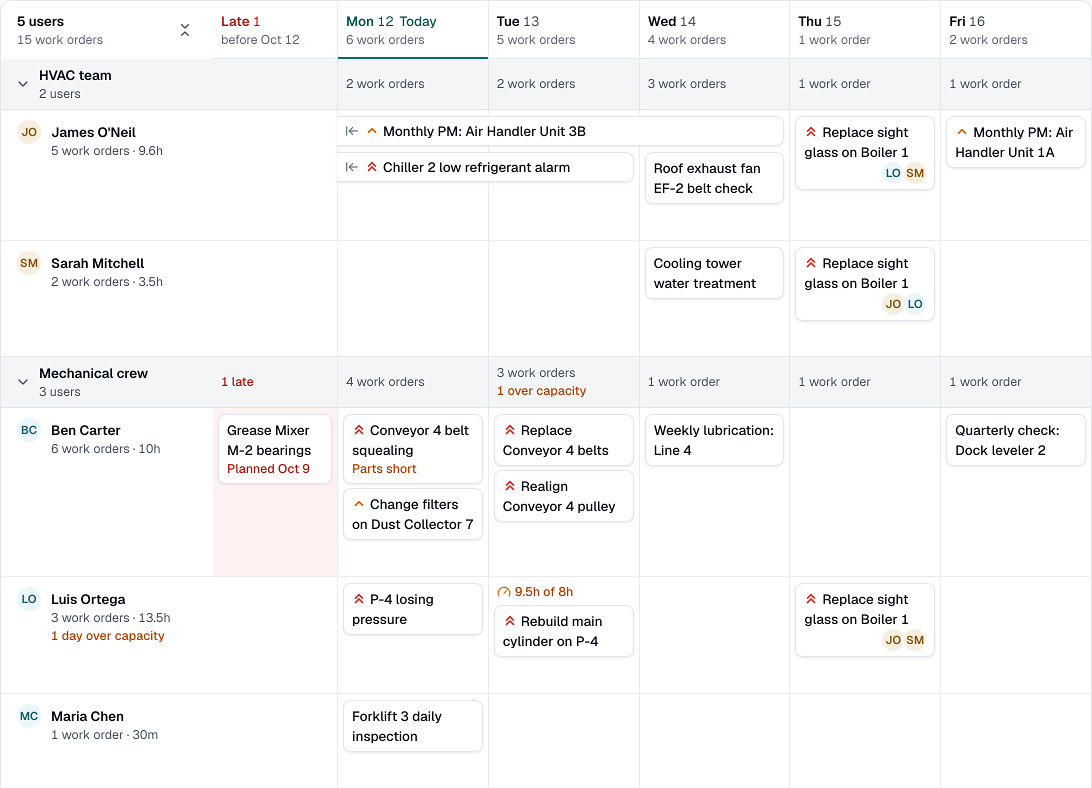
The week is a board of people and days. Drag a job onto a person's day, and see at once who has more than eight hours, what is late and which job is short of parts.
People are grouped by team, and the days run across. A work order with a person and a start date sits on its day, a job that runs over several days is a bar, and open work left from earlier weeks is kept in a Late column.
Slide sideways to see the whole week.
A job's card
Move a job without opening it.
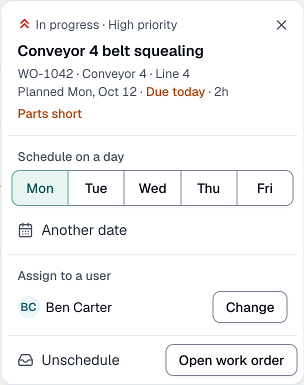
Press a job and its card opens: when it is planned and due, how long it should take, and whether it is short of parts. Pick another day, give it to someone else, take it off the board, or open the work order.
Unscheduled
Work that is not planned yet waits at the side.
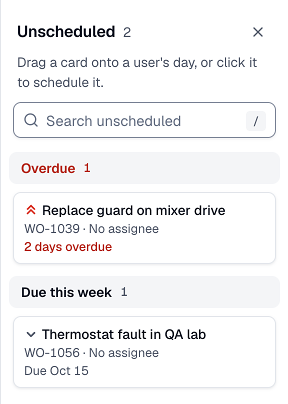
The Unscheduled panel lists open work orders with no date or no assignee: overdue first, then due this week, due later and no due date. Drag a card onto a person's day, or press it to schedule it. A job made from an approved request lands here, because approving does not assign it to anyone.
Late
Late work stays in sight.
An open job whose dates ended before this week is not left behind in a past week. It is kept in a Late column beside the person it belongs to, and the team's row says how many are late. It stays there until it is done or planned again.
Whose week
Show the people you plan for.
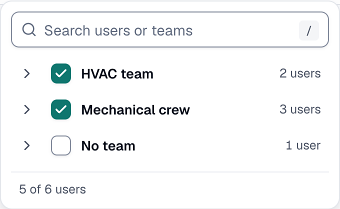
Choose which teams and people the board shows, and it keeps your choice. Press a name to see that one person's week on its own.
Capacity
See an overbooked day before it happens.
Each person's row adds up the week's hours from the jobs' estimates. A day with more than eight hours says so, such as 9.5h of 8h, and the name beside it reads 1 day over capacity. A job that a storeroom cannot cover says Parts short.
How it fits
The planner is the same work orders, laid out by day.
Nothing is entered twice. A move on the board changes the work order, and a change to the work order moves the card.
It is software that shows the work to be done against the people and the days there are to do it, so a week is planned by looking at it instead of by asking around. In Maintensor the planner is part of a CMMS: the cards on the board are the same work orders the crew completes.
How do I schedule a work order?
Drag its card onto a person's day, from the Unscheduled panel or from another day. A move can be undone. On a screen narrower than 1024 px there is no dragging: press the card and choose a day and a person on it.
How does it know someone is overbooked?
It adds up the estimates of the jobs on each person's day. More than eight hours on a weekday is marked on that day and counted under the person's name. The eight hours are fixed and cannot be changed per person.
Can I plan further ahead than this week?
Yes. The board shows one week at a time, and you can step to the next or the previous week or go straight to any week. Weekends can be shown or hidden.
Does it work on a phone?
Yes, in the browser. On a small screen the planner is a list of people, and a press on a name shows that person's week. Jobs are moved from their card.
Does it schedule the work automatically?
No. The planner shows the load, the late work and the conflicts. Who does what, and when, is decided by a person.