The whole week, on one board.
Your people down the side, grouped by team, and their days across the top. Late work has a column of its own, and a day past eight hours says so.
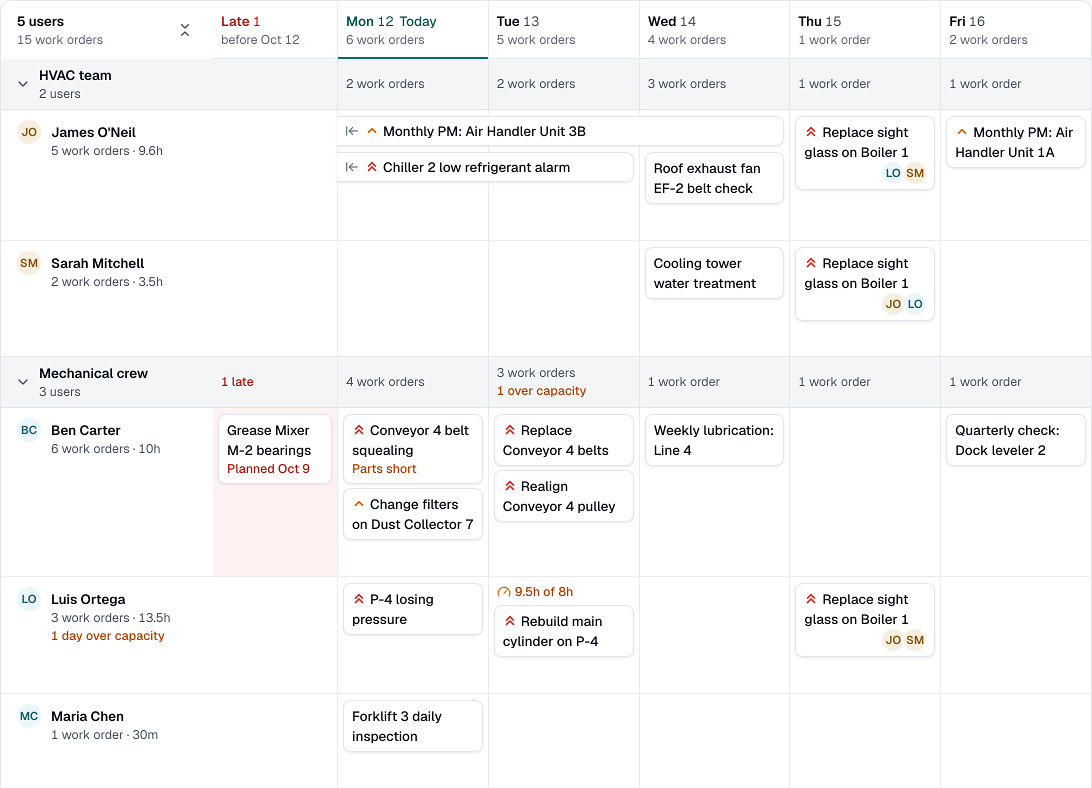
Slide sideways to see the whole week.
Everything a computerized maintenance management system (CMMS) has to do, from the first report of a fault to the month's numbers. Work orders, assets and parts are on every plan, Free included.
Features
Each one opens a page of its own.
Your people down the side, grouped by team, and their days across the top. Late work has a column of its own, and a day past eight hours says so.
Slide sideways to see the whole week.
Who uses it
Everyone signs in. What they see depends on the role they are given.
A maintenance management system is software that keeps a maintenance team's work orders, preventive schedules, assets, spare parts and history in one place. It is also called a CMMS, for computerized maintenance management system. Maintensor is one built to be understood without training.
Work orders, preventive maintenance that schedules itself, checklists, a way for other people to report problems, a register of assets and locations, spare parts with purchasing, a view of the week, and reporting. Those are the nine modules listed on this page.
Work orders, requests, assets and locations, parts and vendors, and time tracking, with up to 3 procedures and 5 recurring work orders. The planner, reporting, QR codes, email notifications and import from Excel and CSV are on Pro, and purchase orders and cost tracking on Max. The pricing page lists every plan.
Yes. A request becomes a work order, a work order points at an asset, uses parts from a storeroom and follows a procedure, and reporting reads all of it. Nothing is typed twice.
No. You can create your organization, add an asset and write your first work order in one sitting. The app opens on four first steps.
Yes, on Pro and Max. An Admin can import locations, assets, parts with their stock, vendors, work orders and users from an Excel (.xlsx or .xls) or CSV file of up to 10 MB and 5,000 rows. You check how the columns match, see every row before anything is saved, and decide what happens to a row that is already in the app: skip it, update it or import it as new. A users file invites each new person by email, with the bill for new paid users shown first. An import has no undo, so the review is the place to catch a mistake.
Yes. Maintensor is a web app that runs in the browser, so there is nothing to install. On a phone the list and the record are shown one at a time, and a checklist runs full screen, one step at a time.
Start the trial, add one asset and write one work order. By the end of the afternoon you will know whether it fits your team.
30-day free trial. No credit card.