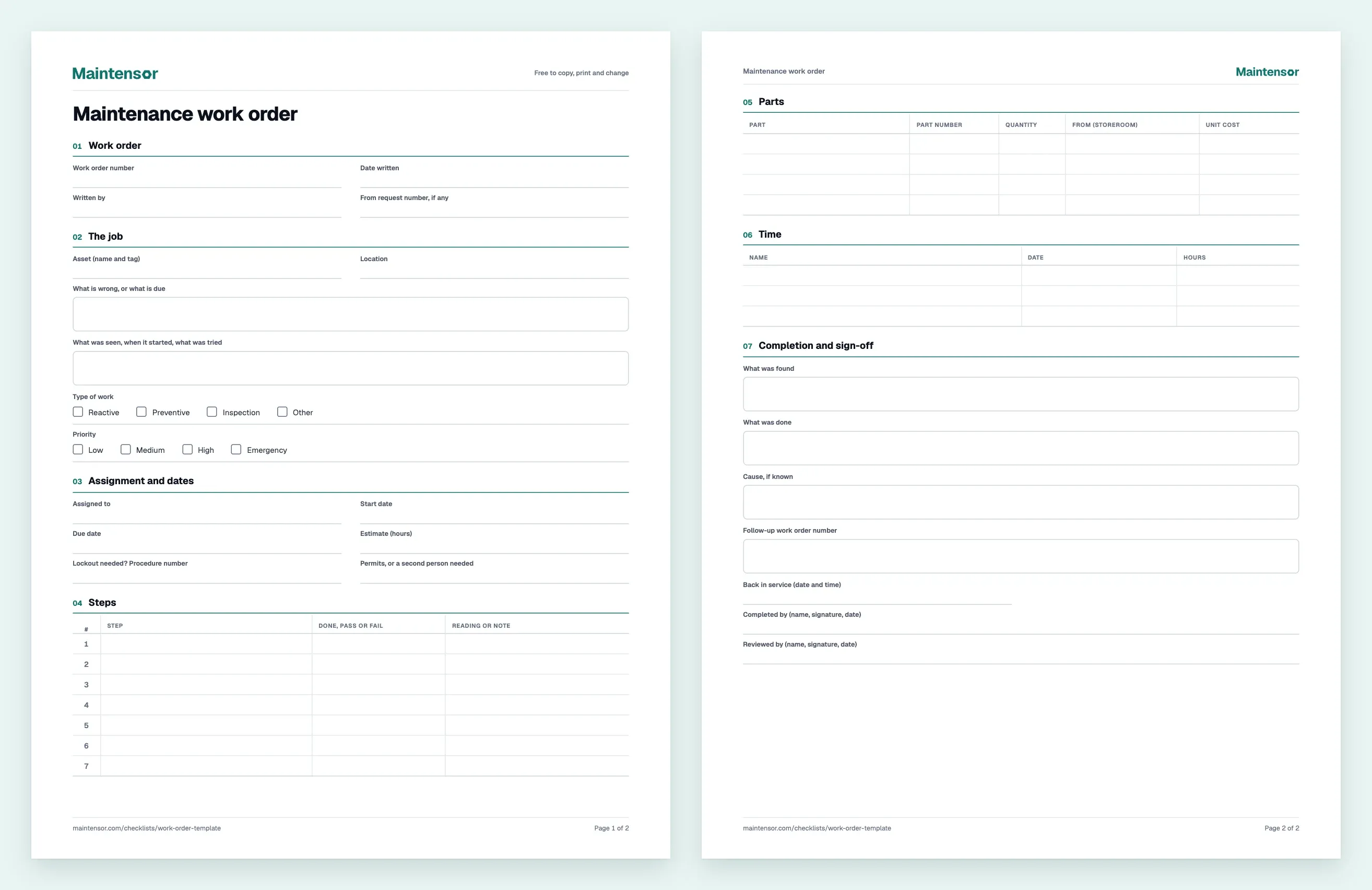
What the form holds
Seven blocks on two pages, in the order a job moves through them. The Excel file adds drop-down lists, a cost for each part and totals for parts and hours.
What each field is for, and how to write a title a technician can act on, is in what a work order is.
A filled-in example: a rooftop unit that stopped cooling
ExampleWO-3127, written on a Tuesday afternoon in June
A made-up office building; every name, number and part is invented.
| Field | Entry |
|---|---|
| Work order number | WO-3127 |
| Date written | Tuesday, June 9, 1:35 p.m. |
| Written by | Susan Clarke, building manager |
| From request number | REQ-488, from a tenant’s office manager: “2nd floor west is 79 degrees” |
| Asset | Rooftop unit RTU-3, serves 2nd floor west |
| Location | Roof, west wing |
| What is wrong | RTU-3: 2nd floor west at 79 °F (26 °C) against a 73 °F (23 °C) setpoint; unit running |
| What was seen | Warm since late morning. The building controls show RTU-3 calling for cooling since 10 a.m., with supply air at 66 °F (19 °C). |
| Type of work | Reactive |
| Priority | High: an occupied floor, and 88 °F (31 °C) forecast for tomorrow |
| Assigned to | Jason Miller |
| Start and due | Tuesday, June 9 |
| Estimate | 2 hours |
| Lockout | Yes: the unit disconnect, under the building’s written procedure for RTU-3 |
| Steps | 1. Lock out RTU-3 at the unit disconnect and confirm it does not start on a call from the thermostat. 2. Check the filters and note their condition. 3. Check the blower belt for wear and tension. 4. Look at the condenser coil from outside and inside. 5. Clean the coil as the unit maker’s manual directs. 6. Restore power, run 20 minutes, record supply and return air temperatures. 7. If the temperatures stay off, stop and call the HVAC contractor for a refrigerant check. |
| Readings | Before: supply 66 °F (19 °C), return 78 °F (26 °C). After 20 minutes: supply 56 °F (13 °C), return 76 °F (24 °C). |
| Parts | 4 pleated filters, 20 x 25 x 2 in (508 x 635 x 51 mm); 1 blower belt, BX48; 1 gal (3.8 L) of coil cleaner. All from the main storeroom. |
| Time | Jason Miller, 2 h 15 min |
| What was found | Condenser coil matted with cottonwood fluff across its whole face. Filters loaded. Blower belt glazed and loose. |
| What was done | Coil cleaned, filters and belt replaced, belt tensioned to the maker’s figure. |
| Cause, if known | Cottonwood season, and filters a month past their change date. |
| Follow-up | WO-3131: add a condenser coil check to RTU-3’s service in May and June. |
| Back in service | Tuesday, June 9, 3:50 p.m.; 2nd floor west at 74 °F (23 °C) by 5 p.m. |
| Completed by | Jason Miller, signed, June 9 |
| Reviewed by | Susan Clarke, signed, June 10 |
Three entries make it useful a year from now: the readings before and after, the cause, and the follow-up that changes the schedule so it does not happen again next June.
Step 7 stops where it does on purpose. In the US, anyone whose work could reasonably be expected to open the refrigerant circuit must pass an EPA-approved Section 608 certification exam (40 CFR 82.161). In Canada, provincial rules set who may handle refrigerant.
Check which refrigerant rule applies to you before the form sends anyone into the circuit. The routine service the job points to is in the HVAC maintenance checklist, and the lockout step follows the site’s written lockout/tagout procedure.
How to use this form
When a step fails
A failed step stops the job, not the paperwork. If a step finds something unsafe, the equipment comes out of service and is tagged, and the new problem gets its own work order. Write its number in the follow-up box.
Short versions: a preventive job and an inspection
A preventive work order comes round again and again, so the form shrinks: the job and its steps are the same every visit, and what is worth writing down is the readings and anything found. Keep these:
The preventive maintenance checklist and the machine’s manual are where to start a procedure. A “next due” box only helps if someone copies the date onto the schedule.
An inspection form is a list of checks, each with a pass or fail and room to say what failed. A failed check is not repaired on the inspection form: it gets its own work order, and that number goes in the last column. Flag means it works today but needs watching.
ExampleA monthly dock door round
Made up: the door, the results and the work order number are invented.
| Check | Result | Note, or follow-up work order number |
|---|---|---|
| Door opens and closes fully, without binding | Pass | Smooth, no binding. |
| Photo eyes stop and reverse the closing door | Fail | The door did not reverse on the left photo eye. Door tagged out. WO-3142. |
| Bottom seal and weatherstripping intact | Flag | Torn at the left corner, still seals. Look again next month. |
| Cables, rollers and hinges: no fraying, no rust, rollers seated | Pass | Clean, rollers seated. |
| Dock leveler lip extends and stores | Pass | Extends and stores fully. |
| Dock bumpers in place and intact | Pass | Both intact. |
Below the checks: inspected by, date and signature. Leave spring and cable repairs to a trained door technician; the full set of checks for the leveler is in dock leveler maintenance.
Filing it so it helps later
- Lead the title with the asset, then the symptom: “RTU-3: 2nd floor west warm”, not “AC”.
- Write numbers, not adjectives: “supply 66 °F”, not “warm”.
- “Fixed” is not a finding. Say what was found and what was done.
- Write the cause when you know it, and “unknown” when you do not.
- File closed forms by asset, not by date. A folder per machine becomes an equipment maintenance log with no extra writing.
The same form in Maintensor
In Maintensor, a work order is a record with the fields of this form, and only the title is required. Every work order gets a number, and photos, PDFs and documents can be attached, up to 25 MB.
- The job and the assignment. Title, Description, Asset, Location, Priority (None, Low, Medium or High) and Type of work (Reactive, Preventive or Other). Then Assigned to (people, teams or both), Starts, Due and Estimate, with dates only and no time of day, and Categories, the procedures and the parts, each from a storeroom.
- The steps block is a procedure, built once from steps such as Checkbox, Number, Inspection check (Pass, Flag or Fail), Photo and Signature. The same procedure can be attached to any number of work orders; a change is published as a new version.
- The time block is the Time and cost tab: time runs from Start work, and can be added or fixed by hand. Notes go on the History tab, which also records who created the work order, who was assigned and each change of status.

What it does not have: no work order templates, no way to copy a work order, and no printable work order. A job that comes round on a schedule is set to repeat instead, and each new work order carries the last one’s title, description, asset, people, procedures and parts.
There is no Inspection or Emergency type and no cause field, so a cause goes in a note. An inspection is a work order whose procedure is a list of Inspection checks: a Fail asks for a note and a photo, then offers a follow-up work order. Only Admins and Full users answer checklists.